Construction Documentation
Reality capture for every phase of the build.
From the first pre-drywall scan to the final as-built record, we document GTA construction the way a builder thinks — every mechanical, every stack, every service run, captured before it disappears behind finishes.
Construction services
Construction
StandardAs-Built Documentation
A finished-state 3D record of the home or building, for owner handoff, warranty files, and future renovation planning.
Construction
UltraDigital Twin (Tagged Scans)
A searchable digital twin of the project — every fixture, mechanical, and finish tagged and linked to specs, warranty docs, and the maintenance schedule.
Construction
PremiumPhase Documentation
A 3D scan at every key milestone — pre-demo, raw space, pre-drywall, pre-finishing, and as-built — for a complete project timeline record.
Construction
UltraPoint Cloud Export
Engineering-grade point cloud deliverables — E57, RCP, RCS, and IFC outputs ready for Revit, ArchiCAD, AutoCAD, and downstream BIM workflows.
Construction
PremiumPre-Drywall Scanning
Capture every stud, stack, and service run before drywall closes the walls. 50–500+ scan positions per home.
Construction
StandardRenovation Pre-Scan
A baseline 3D scan of an existing home before demolition begins. Documents pre-existing conditions for insurance, owner records, and design reference.
Not sure which service fits? Talk to us or see packages and pricing.
What sets our scans apart
Most providers are photographers. We are builders.
Construction expertise, not camera operators
Most real-estate scan providers are photographers with an off-the-shelf scanning kit. We are builders who understand what a stack, a service run, or a junction box means — and we scan accordingly.
Captured for the trades, not the listing
We get into closets, behind vanities, inside mechanical rooms, up into ceilings, and down chases — the tight, technical spaces trades and owners actually need to reference.
A permanent as-built record
A real-estate scan is disposable marketing. Ours is a permanent asset that protects your work through warranty claims, renovations, and ownership changes for years to come.
Precision that holds up in disputes
Measurements accurate to within 1% of reality. Point-cloud data exportable to Revit, AutoCAD, ReCap, and Bentley for true as-built comparison against your original design.
Key benefits
What a Virtualiz3D scan does for you.
Monitor project progress remotely
Executives, project managers, GCs, and clients can walk the site from anywhere in the world. Review progress, flag issues, and make decisions without burning a day on travel.
Assess risk, damage & safety
Document site conditions at any point in time. Share safety concerns, hazard zones, and incident records with stakeholders — all inside an explorable 3D environment.
Thousands of photos in one scan
A single 3D scan replaces thousands of 2D site photos. Every square foot is captured, indexed, and instantly accessible — no more hunting through folders.
Measure remotely, to within 1%
Take accurate dimensional measurements of rooms, openings, mechanicals, and features — no return site visit required. Perfect for trades and planning.
Export to Autodesk, Bentley & FARO
Coloured point clouds open directly in Revit, ReCap, AutoCAD, or any point-cloud platform. Jump-start as-builts and compare against the original design.
A long-term asset for owners
Turn your documentation into a handoff package that keeps selling you. Owners use it for maintenance, renovations, insurance, and facility management for years.
Build a true portfolio
Capture every project across every phase and create a portfolio that shows the full quality of your craftsmanship — not just the final finished photos.
Virtual reality ready
Every scan is explorable in full VR immersion. Let owners, buyers, and investors experience your work without ever setting foot on the job site.
Key functions
What sits inside every scan.
3D Showcase & Virtual Walkthrough
A collection of 360° panoramas deeply connected to the 3D model of the space. Engineers, BIM managers, VDCs, architects, and trades inspect the site remotely — each panorama automatically placed in the correct location with no post-processing. Full VR-ready.
Three ways to navigate your site
Inside View lets you walk every square foot of the job like a video game. Floorplan View gives an instant top-down layout. 3D Dollhouse View shows how the entire property fits together — including true wall thickness and structural layout.
3D Measurements
Take simple, accurate measurements in metric or imperial — remotely — accurate to within 1% of reality. Dimension rooms, openings, mechanical clearances, or the entire site without a return visit. For deeper precision, download the point cloud and measure in ReCap.
Coloured Point Clouds
Open directly in AutoCAD, ReCap, or Revit to jump-start your as-built designs. Fully automatic point-cloud registration across all sweeps, coloured from 360° panorama imagery, and accurate to within 1% of reality — a true BIM-ready construction record.
Floor Plans & Reflected Ceiling Plans
Orthogonal top-down floor plans and overhead reflected ceiling plans — perfect for AEC workflows. Use in AutoCAD as tracing elements, or open in Maya or 3ds Max. Reflected ceiling plans show ventilation, wiring, plumbing, and insulation above every space.
360° Photospheres & OBJ Files
Download unlimited 360° photospheres for editing or inclusion in deliverables. Export the full 3D mesh as an OBJ file — ready for Maya, 3ds Max, Meshlab, SketchUp (with plugin), or full-colour 3D printing of your space.
Tags & search on construction scans
Every mechanical, every fixture — searchable inside the scan.
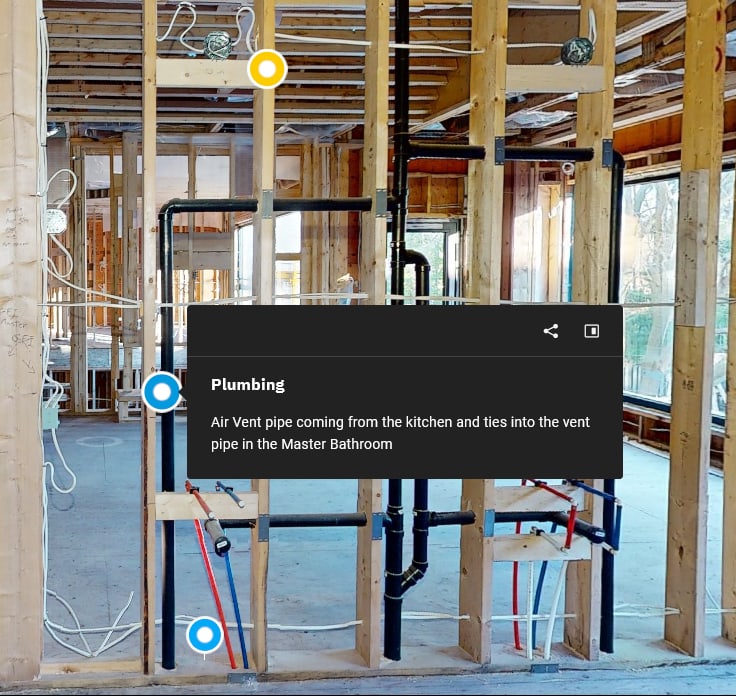
Service tracing tags
Mark every critical service — main plumbing stack, sub-panel circuits, HVAC returns, gas lines, shut-off valves — directly inside the scan. Each anchor opens a panel with the asset name, a short description of what it does, and where it routes to.
Fixture & equipment tags with attachments
Tag the vanity light, the panel, the manifold — and attach the spec sheet, the install sheet, the warranty doc, and a product image. Service techs, owners, and future renovators get the full document trail one click from where the asset actually lives.
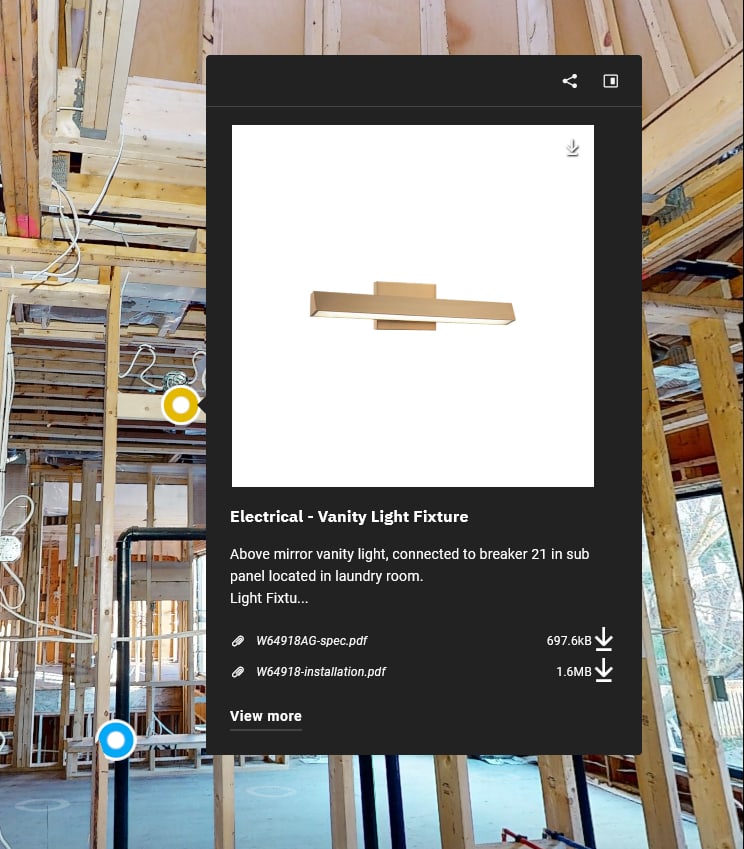
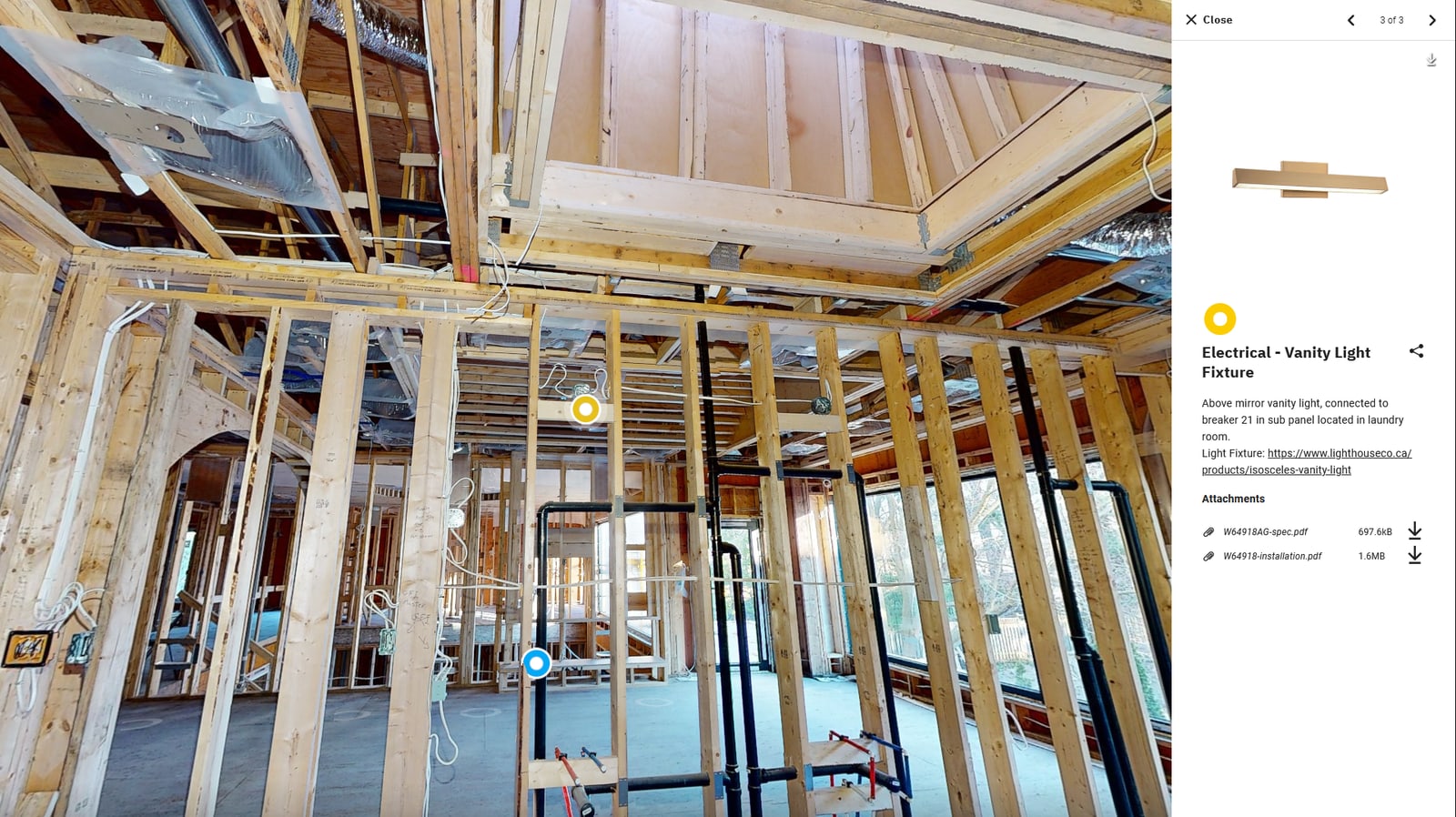
Tagging is included on the Ultra tier as a digital twin layer, or available as an add-on for Standard and Premium tiers.
Ready to scan?
Hold a slot for your next drywall start.
Same-week and next-day appointments for active GTA jobsites.